Reports, royalties, schedules and growth.
One system for your franchise network.
Granite collects each franchise’s sales report, bills royalties and fees from your agreements, and turns the same numbers into heat maps, rankings and annual reviews for every office. Franchise offices run their leads, estimates and crews in it too, all set up the way your network works.
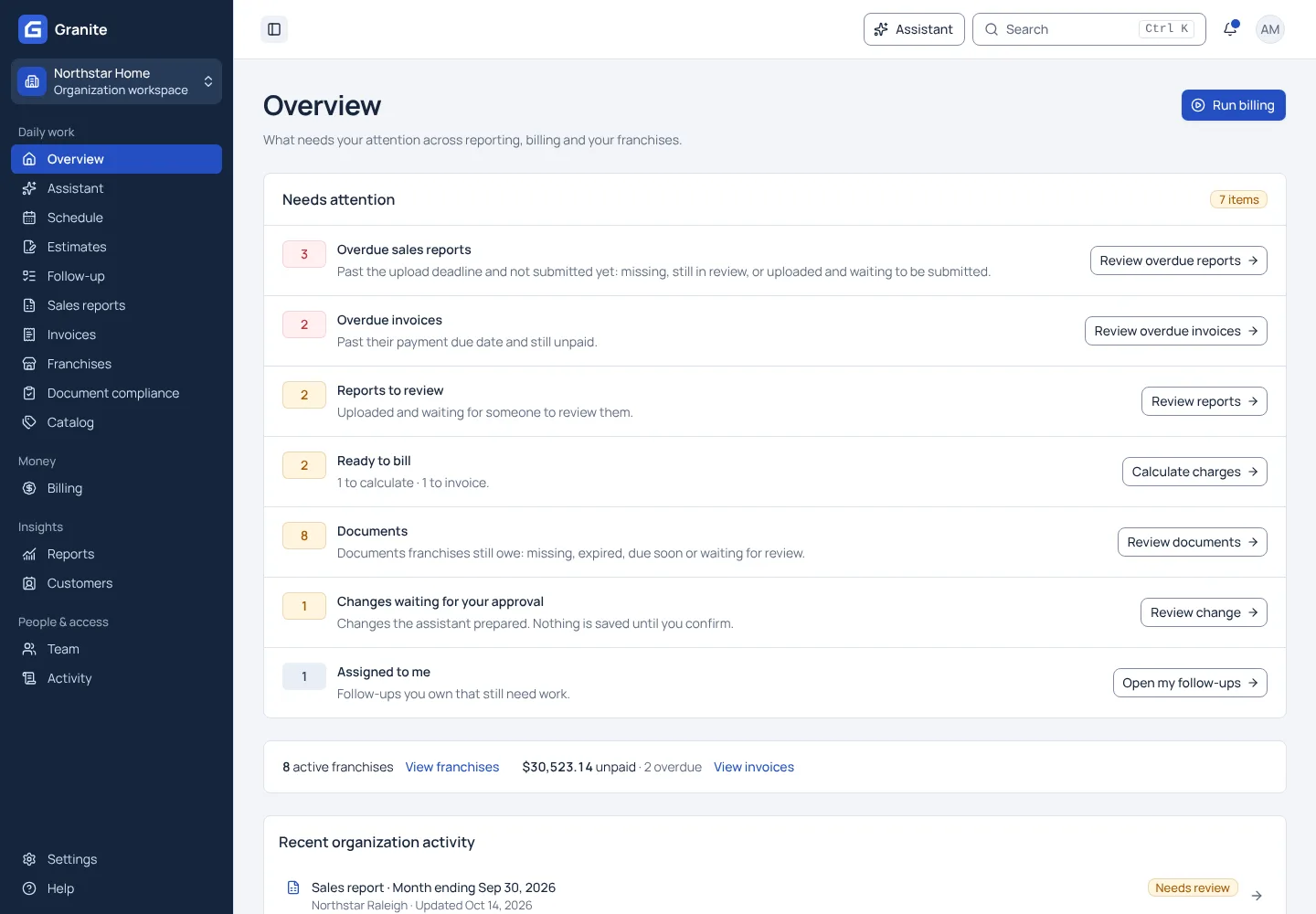
Running a franchise network still depends on email, spreadsheets and memory.
- Sales reports arrive late and in different formats, and someone has to notice which franchises never sent one.
- Royalties live in a spreadsheet one person understands: tiers, minimums, fixed fees and agreement dates, all by hand.
- Invoices go out, payments trickle in, and nobody can say at a glance who still owes what or who is chasing it.
- Office rankings, growth and year-end checks are rebuilt in spreadsheets every year, while franchise offices schedule their crews in yet another tool.
From sales report to paid invoice in three steps.
Franchisees upload their sales report
Each franchise gets its reporting period, due date and reminder emails, and uploads its Excel or CSV report from the franchise workspace. You see every missing or late report across the network.
Granite calculates what each franchise owes
Your royalty and fee rules are set up once, with effective dates. Preview each franchise’s charges against its real report before anything is invoiced.
Invoices go out and payments come in
Franchisees get an email with a card payment link and pay into your own Stripe account. Reminders and late fees follow your policy, and anything unpaid lands in one follow-up queue.
What you get that a spreadsheet cannot give you.
Royalties that match your agreements
Fixed fees, flat or tiered percentages and minimums, with rates that change as a franchise matures, plus per-unit charges, credits and franchise loans. A franchise can keep its own terms where its agreement differs.
Payments that go straight to you
Franchisees pay by card on Stripe-hosted checkout into your own Stripe account. Send each fee to a different account if you need to. Granite never holds the money.
Late work that someone owns
Missing reports, billing blockers and overdue invoices sit in one queue with the amount, the cause, the person following up and the deadline.
An assistant that asks before it saves
Ask which franchises have not reported or what an invoice is for. It can fill in a form or prepare a change, such as a new royalty rate from a date, and nothing is saved until you confirm it.
The rest of the network runs in Granite too.
The sales reports you collect for billing also power analysis for every office, and franchise offices run their leads, estimates and crews in the same system. Each part is set up to match how your organization works.
Sales insights
Heat maps of sales by service and customer class, office graphs set against the whole system, and sales trends across the years, from the reports you already collect.
Top 10 and awards
Rank offices by sales for every class, service and master group, work out each year’s award winners, and chart the system’s history for your annual meeting.
Annual sales review
Each franchise uploads its annual sales file. Granite finds sales that never reached a weekly report, estimates the royalty and fees they would have owed, and builds an Excel workbook for the review.
Scheduling
Each franchise books estimate visits, jobs, meetings and time off for its crew. Corporate sees every franchise’s calendar, with filters for what and who is shown.
Leads and estimates
Website form leads arrive with the right franchise. Offices price jobs from your corporate price list, the customer signs on their phone, and the job goes straight onto the calendar.
Employee and agreement records
Keep each franchise’s employees, personnel files and non-competes in one place, and remind owners well before a franchise agreement comes up for renewal.
Questions franchisors ask before choosing Granite.
Can Granite handle our royalty structure?
A royalty in Granite can combine a fixed fee, a flat or graduated percentage and a minimum, and each can change with tenure: after a number of reporting periods, or months or years since the agreement date. Tiers can measure each reporting period, a rolling window of recent periods, or the calendar or agreement year to date. One-time fees, per-unit charges, credits, franchise loans and late fees sit beside it. Try the free royalty calculator, or send us your terms.
Can Granite show how each office is performing?
Yes, from the sales reports you already collect. Heat maps set services against customer classes with growth, jobs and average ticket, office graphs compare each office with the whole system, and Top 10 lists rank offices for every class, service and master group. You can upload past years’ sales so the history starts before Granite. See sales insights.
Can our franchise offices run their schedule and estimates in Granite?
Yes. Each office books estimate visits and jobs for its crew, prices work from your corporate price list, and has the customer sign the estimate on a phone. Website leads arrive with the franchise they belong to. See scheduling.
Can we set Granite up the way our network works?
Yes. Your royalty rules, reporting periods, required documents, catalog groups, regions, agreement term and renewal notice period are all settings your organization controls, not rules built in for one franchisor.
Do our franchisees have to learn new software?
Very little. A franchise user sees only their own franchise: the report that is due, the upload button, their invoices, their schedule and any documents to renew. They pay invoices by card from the email they receive.
Where does the money go?
Into your own Stripe account. You connect it once, choose which fees go to which account, and franchisees pay by card on Stripe-hosted checkout. Granite never sees card numbers and never holds funds.
Does Granite work with QuickBooks?
Yes, with QuickBooks Desktop and Enterprise. Issued invoices and payments sync through Intuit Web Connector on the Windows computer that runs QuickBooks, at no add-on fee. Sync starts once Granite has checked the connection to your company file. QuickBooks Online is not supported.
Can Granite track franchise insurance and licenses?
Yes. List the documents each franchise must keep current, with a due date and renewal cycle. Granite reminds the franchise before the deadline, your team approves or denies each upload, and you can hold sales report uploads until a required document is on file. See document compliance.
Who can see our numbers?
Only the people you invite. Each person signs in with their own account, their role and franchise assignments decide what they can see and change, and important changes are recorded in an activity history.
What can the Granite assistant do?
It answers questions about the reports, invoices and rules you can already see, opens pages, fills in forms and prepares changes such as a billing rule replacement or a sales report import. Anything that saves, sends or charges waits for you to review and confirm it. It never enters Stripe keys, takes card payments or accepts invitations for you. The assistant is included and on for every organization; if you’d rather your team didn’t use it, ask us and we’ll turn it off for yours. See the assistant.
What do we need to get started?
Your franchise list, each franchise’s royalty terms, a recent sales report and a Stripe account. The getting-started guide lists everything to prepare.
One quote for your whole network, with every feature included.
Granite has no feature tiers and no paid add-ons, and QuickBooks sync is part of it. Granite bills your organization, not your franchisees.
See your own reporting and royalty cycle in Granite.
Bring a recent sales report and your royalty terms. We will walk through the calculation, the invoice and the payment with you.